The Best Under-Desk Keyboard Trays and Cable Management Solutions for Small UK Home Offices in 2026
Disclosure: This post contains affiliate links. As an Amazon Associate I earn from qualifying purchases. Learn more.
Working from a compact desk in a small UK flat or studio comes with a unique set of challenges — and none is more frustrating than having a cluttered, cramped workspace where your keyboard hogs precious surface area and cables snake everywhere like spaghetti junction. The good news? You don't need a bigger desk. You need smarter under-desk organisation.
Under-desk keyboard trays, cable management troughs, and monitor arms can transform even the tiniest work-from-home setup. By reclaiming your desktop surface, you free up space for a notebook, a coffee, or that second monitor your workflow has been crying out for. And when your cables disappear into neat little trays and boxes, your workspace instantly feels calmer, more professional, and easier to focus in.
In this guide, we'll walk through the best under-desk solutions for UK small-space dwellers, covering keyboard trays to tame your typing setup, cable management to banish the wire chaos, and monitor arms that lift your screens off the desk entirely. Every product recommendation is real, available on Amazon UK, and priced in pounds — because we know how every square inch (and every pound) counts.
Why Under-Desk Organisation Matters in a Small Home Office
Let's start with the maths. A typical small desk — say 100 cm by 50 cm — gives you about half a square metre of usable surface. A monitor takes up roughly 35 cm of that. A laptop stand adds another 20 cm. Your keyboard and mouse? Another 30 cm. Suddenly you're left with a sliver of space no bigger than an A4 pad.
By moving your keyboard and mouse under the desk, you instantly reclaim around 30–40 cm of depth — that's nearly half your usable surface area returned. Add a monitor arm that lifts your screen off the desk entirely, and suddenly you have a clean, open workspace that feels twice as large.
Beyond the space savings, there's a genuine ergonomic benefit. An under-desk keyboard tray positions your hands at the correct typing height — elbows at 90 degrees, wrists straight — which reduces strain during long working hours. Cable management trays keep wires off the floor and away from your feet, preventing accidental yanks and making desk vacuuming (yes, we all need to do it) infinitely easier.
For UK flat-dwellers who often work from a corner of the living room or a nook in the bedroom, these upgrades are not just nice-to-haves — they're essential for creating a dedicated, distraction-free workspace in an already tight footprint.
The Best Under-Desk Keyboard Trays
A good keyboard tray is the single most impactful under-desk upgrade you can make. It slides out when you need it, tucks away when you don't, and keeps your typing surface at the right ergonomic height. Here are the top options for small UK home offices.
VIVO Large Under Desk Keyboard and Mouse Tray — £47.99
The VIVO Large Under Desk Keyboard and Mouse Tray (MOUNT-KB01D) is the gold standard for under-desk typing. At 38 x 10 inches (approximately 96 x 25 cm), it's spacious enough to accommodate a full-sized keyboard and a mouse side by side — no need to reach for the mouse on your desktop.
The tray clamps onto the underside of your desk with a sturdy mechanism that requires no drilling, making it ideal for rental flats where you can't make permanent modifications. It includes a dedicated mouse platform on the right side, which slides out slightly further than the keyboard section, giving you a natural mousing position that doesn't compromise your typing angle.
The one-piece design means installation takes about 10 minutes with the included hardware. The tray supports up to 15 lbs (around 7 kg), so it can handle even heavier mechanical keyboards without a wobble. For UK home workers who switch between typing and mousing constantly, the integrated mouse surface is a genuine productivity booster — no more jamming a mouse into the corner of a cramped desk.
Best for: Anyone with a full-sized keyboard who wants a complete typing-and-mousing solution under the desk.
Pros:
- Large surface fits full keyboard plus separate mouse platform
- No-drill clamp installation — perfect for rented flats
- Solid, wobble-free construction
- Smooth sliding mechanism with stoppers
Cons:
- Requires 7 inches of clearance under your desk
- Mouse platform is right-side only (no left-handed version)
VIVO Adjustable Keyboard and Mouse Platform Tray — £44.99
The VIVO Adjustable Keyboard and Mouse Platform Tray (MOUNT-KB03B) is a slightly more compact alternative that offers greater flexibility in positioning. Measuring 25 x 10 inches (approximately 63 x 25 cm), it's a good fit for smaller desks or for users who prefer a narrower typing surface.
What sets this model apart is its fully adjustable mounting system. The tray can be tilted, rotated, and positioned at different heights under the desk, allowing you to find the perfect ergonomic angle for your wrists. The included mouse platform extends on the right side, and unlike the larger model, the entire tray can be adjusted for height in 1-inch increments during installation.
The clamp-on mechanism works with desk thicknesses from 0.5 to 3 inches, covering most standard desks found in UK flats. The tray itself is made from powder-coated steel with a smooth glide rail, and the built-in palm rest adds a touch of comfort during long typing sessions.
Best for: Users who need adjustable positioning or have a narrower desk space.
Pros:
- Adjustable height, tilt, and rotation
- Compact size fits smaller desks
- Built-in palm rest for extra comfort
- No-drill installation
Cons:
- Mouse platform has a smaller surface area
- Requires careful positioning to avoid leg interference
Cable Management Solutions That Actually Work
Once you've got your keyboard sorted, the next step is taming the cable chaos. A tidy desk isn't just about aesthetics — it's about safety, ease of cleaning, and knowing which cable belongs to which device. Here are the best cable management products for small UK home offices.
Cable Management Tray 40cm (2-Pack) — £14.99
If you have multiple cables running from your desk — monitor, laptop charger, desk lamp, phone charger — a cable management tray is the most effective way to keep them organised. The 2 Pack Cable Management Tray 40cm provides two metal troughs that mount under your desk, giving you a dedicated channel to route cables through.
Each tray measures 40 cm long and 10.5 cm wide, with multiple entry and exit points so you can route cables in any direction. The trays are made from powder-coated steel with a black finish that blends into the underside of most desks. They mount with screws (included), and take about 15 minutes to install with a standard screwdriver.
Once installed, simply gather each cable, route it through the tray, and let the excess length sit inside the trough out of sight. The open design means you can still access cables when you need to unplug something — no more crawling under the desk to find the right plug.
Best for: Desks with 3+ cables that need a permanent routing solution.
Pros:
- Two trays cover most small desks
- Open design for easy cable access
- Sturdy steel construction
- Excellent value at under £15 per pack
Cons:
- Requires small screws for installation
- Needs planning to route cables neatly
Neatify Cable Management Box Large — £19.99
For desks near a wall socket or extension lead, the Neatify Cable Management Box Large offers a different approach — instead of routing cables along the underside of the desk, it hides the actual plug and adapter mess inside a sleek box on the floor or on top of the desk.
The box measures 33 x 12.5 x 14 cm, large enough to hold a 6-way extension lead plus several bulky power adapters. It's made from durable plastic with a wood-effect finish that doesn't look out of place in a living room or bedroom — important when your home office doubles as your dining area. The lid has cut-outs on both sides for cables to enter and exit cleanly.
Inside, the box has a built-in cable spool to wind excess cable length around, preventing tangles. The lid stays closed with magnetic clips and can be fully removed when you need to access the sockets inside. For UK flats where the only wall socket is in an awkward corner, this box turns the cable-socket mess into a tidy, furniture-like object.
Best for: Hiding extension leads and bulky power adapters near desks.
Pros:
- Wood-effect finish blends with furniture
- Large enough for multi-way extension leads
- Magnetic lid for easy access
- Built-in cable spool
Cons:
- Takes up floor or desktop space (not under-desk)
- Plastic construction feels slightly lightweight
VELCRO Brand Cable Ties 15-Pack — £6.99
Sometimes the simplest solution is the best. The VELCRO Brand Cable Ties 15-Pack provides reusable, adjustable wraps that let you bundle cables together in seconds. Each tie is 15 cm long and wraps around any cable bundle up to about 2.5 cm in diameter.
Unlike plastic zip-ties, these are reusable — just wrap, wrap, wrap and they hold firmly. When you need to add or remove a cable, unwrap and re-wrap. They're perfect for bundling the cables behind your monitor, along the edge of your desk, or inside a cable management tray.
The pack of 15 is enough to organise a typical home office setup: bundle monitor and laptop cables together, wrap the excess length of your desk lamp cable, group phone and tablet chargers at the socket end. At £6.99, they're the cheapest upgrade on this list and arguably the one with the highest impact-per-pound ratio.
Best for: Quick, flexible cable bundling anywhere in your setup.
Pros:
- Reusable — adjust any time
- No tools or adhesive required
- Available everywhere (even supermarkets)
- Cheapest option on this list
Cons:
- Won't hide cables, only bundles them
- Not suitable for very thick cable bundles
Monitor Arms: The Ultimate Desk-Space Reclaimers
While not strictly under-desk products, monitor arms work beautifully alongside keyboard trays and cable management to create a fully optimised small-desk setup. By lifting your monitor off the desktop, you free up the entire surface underneath — exactly the area your keyboard tray now occupies.
ErGear Single Monitor Arm — £28.48
The ErGear Single Monitor Arm is one of the best-value monitor mounts on the UK market. It supports screens from 13 to 34 inches and up to 9 kg, covering everything from ultra-wide productivity monitors to standard 24-inch displays common in home offices.
The gas-spring mechanism allows effortless height adjustment — just lift or push down to find your perfect eye level. The arm extends up to 23 inches from the desk edge and retracts to sit flush against the back when not extended. It mounts via C-clamp or grommet, both included.
For a small desk setup, the key benefit is the reclaimed surface. A typical monitor stand takes up 25 x 20 cm of desk space. By mounting the monitor on this arm, you free up that entire area — exactly where a notebook, planner, or your morning coffee can now live.
Best for: Any small desk with a single monitor that needs height-adjustable mounting.
Pros:
- Excellent value at under £30
- Gas-spring height adjustment
- Supports large monitors up to 34 inches
- Two mounting options (clamp and grommet)
Cons:
- Cable management clips could be better
- Arm can sag slightly with very heavy screens
HUANUO Single Monitor Arm — £25.99
The HUANUO Single Monitor Arm is the budget champion, priced at just £25.99. It supports 13 to 32-inch screens and comes with the same gas-spring mechanism found on more expensive arms. The build quality is solid, with an aluminium alloy body and steel reinforcement at the pivot points.
Installation is straightforward — the C-clamp fits desks up to 4 cm thick, and the arm attaches in minutes with the included hex key. The integrated cable clips run your monitor cable along the arm, keeping it out of sight and complementing your under-desk cable management setup.
At this price point, it's an easy upgrade for anyone still using their monitor's original stand. For the cost of two takeaway coffees in London, you reclaim significant desk space and improve your viewing ergonomics.
Best for: Budget-conscious upgraders who want basic gas-spring functionality.
Pros:
- Lowest price for a gas-spring monitor arm
- Solid aluminium construction
- Integrated cable routing
- Supports up to 32-inch screens
Cons:
- Limited tilt adjustment range
- No USB ports on the base
Buying Guide: How to Choose Your Under-Desk Setup
Building the perfect under-desk setup isn't about buying everything on this list. It's about choosing the combination that solves your specific problem. Here's how to decide.
Start with your biggest pain point. If your keyboard is constantly fighting for space with your notebook and coffee, start with a keyboard tray. If cables are a tangled mess that you trip over, start with cable management.
Measure your under-desk clearance. Both keyboard trays require at least 7 inches (18 cm) of clearance between the desk underside and your thighs/knees. Sit at your desk and measure this space before ordering — if you have a shallow desk with a drawer underneath, a keyboard tray may not fit.
Think about routing. Cable management is most effective when planned. Map out which cables run where: monitor cable needs to reach the socket, laptop charger needs to reach your laptop, phone charger needs to be accessible. A cable management tray along the back edge of the desk catches most of these.
Layer your solutions. The ideal small-desk setup combines: a keyboard tray (for typing), a monitor arm (to lift the screen), and a cable management tray (to hide the wires). Add a cable management box near the wall socket if you use an extension lead. Start with one piece and build up.
Consider your rental situation. If you're renting and can't drill into the desk, all the products here except the cable management tray use clamp-on or no-drill installation. The VELCRO ties and Neatify box require zero installation.
FAQ
Q: Will a keyboard tray work with any desk?
A: Most keyboard trays require a desk edge that's at least 1.5 cm thick and an overhang of at least 5 cm for the clamp to grip. They also need about 7 cm of clearance between the desk underside and your thighs. Measure before buying.
Q: Can I install a keyboard tray on a glass desk?
A: Clamp-on trays generally work on glass desks, but you should use rubber pads (often included) to prevent scratching. Avoid over-tightening the clamp, as glass desks are more fragile. Consider a free-standing keyboard platform instead for glass desks.
Q: Do cable management trays work with standing desks?
A: Yes — in fact they're even more important with standing desks, as cables need slack to move with the desk height. Route extra cable length into the tray so the cables have room to extend when you stand.
Q: How many cables can a cable management tray hold?
A: A 40 cm tray can comfortably hold 5–8 cables, depending on their thickness. For most small home offices, one or two trays is sufficient. Use VELCRO ties to bundle related cables inside the tray.
Q: Will a monitor arm fit my monitor?
A: Check the VESA pattern on the back of your monitor. Most monitors use a 75x75 mm or 100x100 mm pattern, which both the ErGear and HUANUO arms support. If your monitor doesn't have VESA holes, you may need an adapter plate.
Q: Are these products easy to install?
A: Yes. Keyboard trays take 10–15 minutes with a screwdriver. Monitor arms take 15–20 minutes with the included hex key. Cable management trays take 15 minutes with a drill or screwdriver. Cable ties take seconds. All hardware is included.
Q: Do these upgrades add value to a rental property?
A: Since all the products featured here (except the cable management trays) use no-drill clamp or adhesive installation, they won't damage your desk. You can remove them when you move out without leaving marks. The VELCRO ties and Neatify box require zero installation — they're completely removable.
Q: What's the most cost-effective first upgrade?
A: Start with the VELCRO Brand Cable Ties at £6.99 — they cost less than two coffees and instantly make any desk feel more organised. Next, add a cable management tray for £14.99. Then a monitor arm at £25.99 or £28.48. Finally, a keyboard tray at £44.99 or £47.99 when you're ready for the full upgrade.
Top Picks from This Article
We earn a commission if you make a purchase, at no additional cost to you.
ErGear Single Monitor Arm
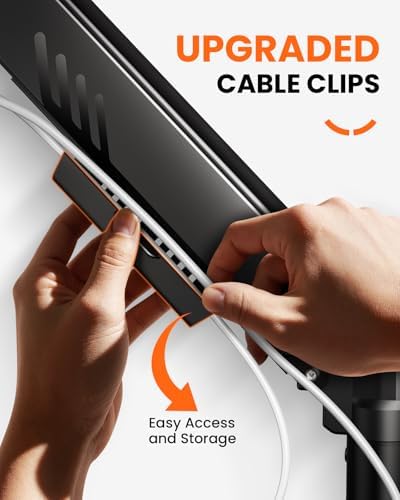
Fully adjustable gas-spring monitor mount for 13-34 inch screens, tool-free VESA, 9kg capacity
£28.48
Price accurate as of 2026-07-10
Check Price on Amazon →HUANUO Single Monitor Arm

Gas spring single monitor arm for 13-32 inch screens, C-clamp and grommet mount, frees up small desk space
£25.99
Price accurate as of 2026-07-10
Check Price on Amazon →Small Space Living is reader-supported. When you buy through links on our site, we may earn an affiliate commission from Amazon Associates and other affiliate programs. As an Amazon Associate we earn from qualifying purchases.
Prices and availability are accurate as of the date/time indicated and are subject to change. Any price and availability information displayed on Amazon at the time of purchase will apply to the purchase of this product.