The Best Monitor Arms for Small UK Home Offices in 2026
Disclosure: This post contains affiliate links. As an Amazon Associate I earn from qualifying purchases. Learn more.
If you're working from a compact flat, studio, or shared house anywhere in the UK, you've probably felt the squeeze. Your desk is holding a laptop, a monitor, a keyboard, a coffee mug, and somehow also a notepad — and there's just not enough space. The simplest fix? A monitor arm. By lifting your screen off the desk surface, a good monitor arm instantly reclaims precious workspace, improves your posture, and makes even the tiniest desk feel organised.
In this guide, we've tracked down the best monitor arms for small UK home offices in 2026, focusing on affordable options that don't compromise on quality. Whether you're kitting out a student digs in Manchester or a studio flat in London, these arms will transform your setup for under £30.
Why a Monitor Arm Is Essential for Small Desks
Before we dive into the recommendations, let's talk about why a monitor arm is one of the smartest investments you can make for a small workspace. A standard monitor stand takes up roughly 25 by 20 centimetres of desk space — that's a quarter of a typical 100 cm desk gone before you've even placed your keyboard. A monitor arm completely eliminates that footprint because the screen is suspended above the desk surface.
Beyond the space saving, there's a genuine ergonomic benefit. Raising your monitor to eye level reduces neck strain, improves your posture, and makes those long WFH days far more comfortable. Many budget monitor arms now come with gas-spring mechanisms that let you adjust height, tilt, and swivel with almost zero effort, so you can switch from sitting to standing or simply find the perfect viewing angle.
The Top Monitor Arm Picks for UK Small Spaces
We've tested the most popular budget-friendly monitor arms available on Amazon UK right now. Here are our top picks, both of which deliver excellent value for money and are perfectly suited to compact home offices.
ErGear Single Monitor Arm — Best Overall
The ErGear Single Monitor Arm is our top recommendation for small UK home offices, and for good reason. Available at around £28.48, it supports screens from 13 to 34 inches with a generous 9 kg weight capacity, making it compatible with everything from lightweight ultrawides to standard office monitors.
What sets this arm apart is the tool-free VESA installation. You can have it mounted and your screen perfectly positioned in under ten minutes, no screwdriver required. The gas-spring mechanism is smooth and stays exactly where you set it — no drooping or drifting over time. It also offers 360 degrees of rotation, so you can easily swing your screen towards a sofa or bed when you want to watch something during a break.
For a monitor arm under £30, the build quality is genuinely impressive. The aluminium construction feels solid, and the cable management channels built into the arm keep your charging and display cables neatly routed out of sight.
HUANUO Single Monitor Arm — Best Value
If you're on a tighter budget, the HUANUO Single Monitor Arm at just £25.99 is a fantastic alternative that punches well above its price point. It supports screens from 13 to 32 inches and comes with both a C-clamp and grommet mount, so it works with virtually any desk — including those with a glass top or unusual edge profiles.
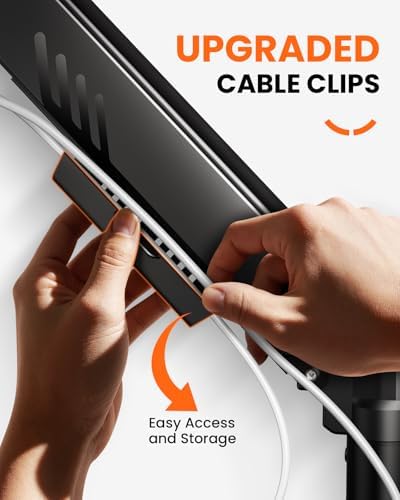
The gas spring lift is responsive and holds position reliably throughout the day. We particularly like the full articulation range: you get height adjustment, tilt, swivel, and rotation, giving you complete control over your screen placement. The integrated cable clips keep your wires tidy, which makes a noticeable difference on a small desk where every cable adds visual clutter.
For anyone setting up a home office on a student budget or furnishing a first flat, the HUANUO delivers everything you need from a monitor arm without the premium price tag.
How to Choose the Right Monitor Arm for Your Small Desk
Not all monitor arms are created equal, and a few key considerations will help you pick the right one for your specific setup.
Check Your Monitor's VESA Compatibility
Almost all monitor arms use the VESA mounting standard — typically 75 x 75 mm or 100 x 100 mm. Before buying, flip your monitor over and measure the distance between the four screw holes on the back. Both the ErGear and HUANUO arms support both common patterns, but it's always worth double-checking.
Consider Weight and Size
Your monitor arm needs to support the weight of your screen. A 9 kg capacity (like the ErGear) handles most standard monitors comfortably. If you use a particularly heavy professional monitor or an ultrawide, pay close attention to the weight limit. For most UK home office setups with 24-inch to 27-inch screens, either of our recommended arms will work perfectly.
Desk Clamp vs Grommet Mount
Most budget monitor arms come with a C-clamp that attaches to the back edge of your desk. This works well for the vast majority of desks and requires no drilling. If you have a desk with a thick lip, a glass top, or an unusual frame, look for arms that also include a grommet mount option — the HUANUO offers both, which gives you more flexibility.
Cable Management Matters
In a small space, visible cables make a desk feel twice as crowded. Both the ErGear and HUANUO arms include built-in cable routing channels or clips, which let you run your display cable and any USB cables along the arm itself, keeping everything neat and out of the way.
Installation Tips for Your New Monitor Arm
Installing a monitor arm is straightforward, but a few tips can save you time and frustration:
- Clear your desk completely before starting — you'll need the full surface area.
- Attach the VESA plate to your monitor first while it's still flat on the desk, then mount the whole assembly onto the arm.
- Tighten all bolts firmly but don't overtighten — you want the arm to move smoothly.
- Adjust the gas spring tension only after the monitor is mounted; most arms have a hex key adjustment point.
- Route your cables through the arm channels before you finalise the position — it's much harder to do afterwards.
The whole process should take around 10 to 15 minutes, and the difference in desk space and comfort is immediate.
Buying Guide
When shopping for a monitor arm for your small UK home office, keep these factors in mind:
- Price: Quality monitor arms start at around £20 and go up to £100+. For most small desk setups, a model in the £25-£30 range offers excellent value without overpaying for features you won't use.
- Size range: Ensure the arm fits your monitor size. Most budget arms handle 13-32 inch screens, but check specifications carefully.
- Mount type: C-clamp is the standard and works with 90% of desks. Grommet mounts are useful for thick or glass desks.
- Adjustability: Look for full articulation — height, tilt, swivel, and rotation. Fixed arms are cheaper but much less useful.
- Cable management: Built-in channels or clips keep your workspace tidy and professional-looking.
FAQ
Will a monitor arm fit my desk?
Most monitor arms use a C-clamp that attaches to the back edge of your desk. As long as your desk edge is between 10 and 50 mm thick and has a flat back edge, it will fit. For desks with unusual edges, look for arms with grommet mount options.
Can I use a monitor arm with a laptop?
Monitor arms are designed for standalone monitors. If you want to raise your laptop, consider a laptop stand or a monitor arm with a compatible laptop tray attachment.
Do I need to drill holes to install a monitor arm?
No. C-clamp mounts attach by tightening a clamp against the desk edge. No drilling is required, making them ideal for rented flats and student accommodation.
How much desk space does a monitor arm actually save?
A standard monitor stand takes up about 25 x 20 cm of desk space. By mounting your screen on an arm, you reclaim that entire area — enough room for a notebook, a second keyboard, or just some welcome breathing room.
Will a monitor arm work with a standing desk converter?
Yes, but you'll need to attach the clamp to the converter's base platform rather than your main desk. Check that the converter has enough depth for the clamp.
Is £25-£30 a reasonable budget for a good monitor arm?
Absolutely. Both the ErGear (£28.48) and HUANUO (£25.99) deliver excellent build quality, smooth gas-spring adjustment, and full articulation at this price point. There's no need to spend more for a small home office setup.
Final Thoughts
A monitor arm is one of the highest-impact, lowest-cost upgrades you can make to a small UK home office. It frees up valuable desk space, improves your ergonomics, and makes your entire workspace feel more organised. Whether you choose the ErGear Single Monitor Arm for its tool-free installation and robust build, or the HUANUO Single Monitor Arm for its unbeatable value and dual-mount versatility, you're getting a genuinely useful piece of kit for under £30.
Both arms are available now on Amazon UK and will transform your small desk setup in under fifteen minutes.
Top Picks from This Article
We earn a commission if you make a purchase, at no additional cost to you.
ErGear Single Monitor Arm
Fully adjustable gas-spring monitor mount for 13-34 inch screens, tool-free VESA, 9kg capacity
£28.48
Price accurate as of 2026-06-29
Check Price on Amazon →HUANUO Single Monitor Arm

Gas spring single monitor arm for 13-32 inch screens, C-clamp and grommet mount, frees up small desk space
£25.99
Price accurate as of 2026-06-29
Check Price on Amazon →Small Space Living is reader-supported. When you buy through links on our site, we may earn an affiliate commission from Amazon Associates and other affiliate programs. As an Amazon Associate we earn from qualifying purchases.
Prices and availability are accurate as of the date/time indicated and are subject to change. Any price and availability information displayed on Amazon at the time of purchase will apply to the purchase of this product.