The Best Laptop Stands for Small UK Desks in 2026
Disclosure: This post contains affiliate links. As an Amazon Associate I earn from qualifying purchases. Learn more.
Working from a small flat, studio, or university digs in the UK means your desk space is precious. Every centimetre counts. If you're hunched over a laptop on a cramped desk, you're not just wasting valuable surface area — you're also putting your neck and shoulders through unnecessary strain. A good laptop stand solves both problems at once: it lifts your screen to eye level (better posture) and frees up desk real estate underneath for your keyboard, mouse, or just a proper cup of tea.
In this guide, we've tested and rounded up the best laptop stands for small UK desks in 2026, from budget buys under a tenner to more robust adjustable options. Whether you're studying in a halls of residence, WFH in a London box-room, or just trying to keep your tiny desk organised, there's something here for you.
Why You Need a Laptop Stand in a Small Space
Let's be honest — laptops are designed for portability, not ergonomics. The screen sits far too low, forcing you to look down, which over time leads to that all-too-familiar "tech neck." A laptop stand raises the screen to eye level so you can sit up straight. That's good for your spine, but in a small space it also frees up the actual desk surface.
With a stand, you can slide a wireless keyboard underneath when you're typing, and tuck a mouse away when you're not. Suddenly, that cramped 60cm desk feels much more usable. Plus, many laptop stands improve airflow around your device, keeping it cooler during long study or work sessions — no more burnt thighs from a hot laptop on your lap.
What to Look For in a Compact Laptop Stand
Before we get to the recommendations, here's what matters most when shopping for a laptop stand for a small UK desk:
Size and footprint. Not all laptop stands are created equal. Some have a wide base that takes up more room than the laptop itself — counterproductive in a small space. Look for narrow or foldable designs that sit neatly on your desk.
Adjustability. A fixed-angle stand is fine if you're certain about your viewing preference, but an adjustable stand lets you tweak the angle depending on whether you're typing, reading, or video-calling. Multiple angle settings give you flexibility.
Build and stability. A wobbly stand is worse than no stand at all. Aluminium or sturdy plastic construction ensures your laptop stays put. Check whether it has non-slip pads or grips to prevent sliding.
Ventilation. A laptop that can't breathe will throttle its performance and get uncomfortably hot. Open designs with cutouts or mesh allow airflow underneath your device.
Portability. If you move between rooms, carry your laptop to lectures, or work in different spots around your flat, a lightweight foldable stand is a must.
Best Budget Pick: Amazon Basics Laptop Stand (£6.97)
At just £6.97, the Amazon Basics Laptop Stand with 6-Angle Adjustment is an absolute steal. Don't let the low price fool you — this is a genuinely well-designed piece of kit that does everything a laptop stand needs to do for the vast majority of users.
It's made from lightweight but sturdy plastic and folds completely flat, making it easy to toss in a backpack when you're heading to a coffee shop or the library. The standout feature is the six-angle adjustment system — just squeeze the latch and tilt the stand to your preferred viewing angle. Whether you want a gentle incline for typing or a steeper angle for watching videos, there's a setting that works.
The stand fits laptops from 10 to 15.6 inches, which covers most standard models. It's ventilated with an open design, so your laptop stays cool even during long work sessions. The non-slip silicone pads on both the base and the platform keep everything securely in place — no sliding around when you're typing at speed.
For small desks, the compact footprint is ideal. It lifts your laptop by about 5-6 cm at the rear, which is enough to make a meaningful difference to your posture without taking over your workspace. Pair it with a separate wireless keyboard and mouse, and you've got a proper ergonomic setup for less than a tenner.
The only real trade-off at this price point is the plastic construction — it won't feel as premium as an aluminium stand, but it's plenty durable for everyday use. For anyone on a student budget or just dipping their toes into better desk ergonomics, this is the obvious starting point.
Best Adjustable Pick: Lamicall Adjustable Laptop Stand (£25.99)
If you want something a bit more substantial, the Lamicall Adjustable Laptop Stand at £25.99 is a fantastic mid-range option. It's made from aluminium, giving it a premium feel and excellent heat dissipation — aluminium naturally draws heat away from your laptop.
The Lamicall stand features a fully adjustable hinge design that lets you find the perfect height and angle for your setup. Whether you prefer a low angle for relaxed browsing or a higher tilt for focused work, you can dial it in precisely. Unlike the Amazon Basics stand (which has six preset angles), the Lamicall offers continuous adjustment, so nothing is ever "just not quite right."
It supports laptops from 10 to 17.3 inches, meaning it'll handle even larger work laptops and gaming machines. The build quality is excellent — the aluminium body feels solid and doesn't flex under pressure. Rubber pads on both the base and the platform prevent scratches and keep everything firmly in place.
For small-space dwellers, the footprint is impressively narrow. The stand's open hollow design also promotes maximum airflow, which is a real bonus if you're pushing your laptop hard with creative software or development work. It's still lightweight enough to move around your flat, even if it's not as packable as the folding Amazon Basics option.
At £25.99, it's a meaningful step up in materials and adjustability without breaking the bank. If you spend hours at your desk and care about having your viewing angle exactly right, this is the one to go for.
Comparing the Two
Both stands serve the same core purpose — lifting your laptop to a healthier viewing height — but they cater to slightly different needs.
| Feature | Amazon Basics (£6.97) | Lamicall (£25.99) |
|---|---|---|
| Material | Plastic | Aluminium |
| Angles | 6 preset positions | Continuous adjustment |
| Laptop size | 10–15.6 inch | 10–17.3 inch |
| Foldable | Yes, flat | No, fixed open design |
| Weight | Very lightweight | Moderate |
| Best for | Budget, students, portability | Premium feel, precise ergonomics |
The Amazon Basics stand wins on price and portability. It's cheap enough that you can buy one for every desk and bag without thinking twice. The Lamicall wins on build quality, materials, and adjustability. If you spend eight hours a day at your desk, the extra investment is easily justified.
How to Set Up Your Laptop Stand for Best Ergonomics
Getting the most out of your laptop stand is about more than just putting your laptop on it. Here's a quick setup guide:
- Height first. Adjust the stand so the top of your screen is at or just below eye level. You should be looking slightly downwards, not up or significantly down.
- Add a keyboard and mouse. With your laptop raised, typing on the built-in keyboard becomes awkward. A separate wireless keyboard and mouse let you keep your arms at a comfortable 90-degree angle.
- Watch your neck. If you find yourself craning forward to see the screen, you may need reading glasses or a larger display. The stand should bring the screen to you, not the other way around.
- Check your lighting. Position your desk so windows are to the side, not behind your screen (which causes glare) or in front (which shades your work).
Buying Guide
What to Consider Before Buying a Laptop Stand
Measure your desk first. The whole point of a laptop stand in a small space is to reclaim surface area. If the stand itself is too wide, you've defeated the purpose. Measure the depth and width of your desk, and check the stand's dimensions before buying.
Think about your typical use case. If you move around a lot — between home, the library, and coffee shops — go for a foldable, lightweight design like the Amazon Basics stand. If you work from the same spot every day, the sturdier aluminium build of the Lamicall stand will serve you better.
Consider your laptop model. Heavier laptops (especially 15-inch+ models) benefit from the more robust support of an aluminium stand. Smaller, lighter laptops are fine on either option. Always check the maximum weight capacity.
Don't forget ventilation. A solid, flat stand that blocks your laptop's underside vents will cause overheating. Choose open or ventilated designs, especially if you use your laptop for gaming, video editing, or other intensive tasks.
Budget realistically. At £6.97, the Amazon Basics stand is a no-brainer if you're on a tight budget. At £25.99, the Lamicall offers genuine upgrades in materials and adjustability. Both represent excellent value for money — you don't need to spend £50+ to get a good laptop stand.
FAQ
Are laptop stands worth it for a small desk?
Absolutely. A laptop stand frees up desk space by lifting your laptop, allowing you to use a separate keyboard and mouse underneath. It also improves posture and airflow. For small desks, it's one of the most cost-effective upgrades you can make.
Can I use a laptop stand with an external monitor?
Yes, many people do. The laptop stand can sit alongside or under your monitor stand, or you can use the laptop itself as a second screen at eye level. Just make sure your desk has enough total surface area.
Will a laptop stand fit a MacBook?
Yes. Both the Amazon Basics (10–15.6 inch) and Lamicall (10–17.3 inch) stands are compatible with all modern MacBook models, including the MacBook Air and MacBook Pro.
Do I need a separate keyboard and mouse?
Technically no, but practically yes. Once your laptop is raised to eye level, typing on the built-in keyboard becomes uncomfortable. A separate wireless keyboard and mouse give you a proper ergonomic setup. They don't have to cost much — even a basic £15 wireless combo transforms the experience.
What if my laptop still feels too hot?
Make sure the stand has open ventilation or cutouts. Both the Amazon Basics and Lamicall stands are designed with airflow in mind. If you're still concerned, consider a stand with active cooling (a built-in fan) — though these are less common and more expensive.
Can I use a laptop stand on my lap?
Most laptop stands are designed for desk use. Some foldable models can be used on your lap, but the stability won't be the same. If you work from your lap often, look for a dedicated lap desk instead.
Top Picks from This Article
We earn a commission if you make a purchase, at no additional cost to you.
Amazon Basics Laptop Stand with 6-Angle Adjustment
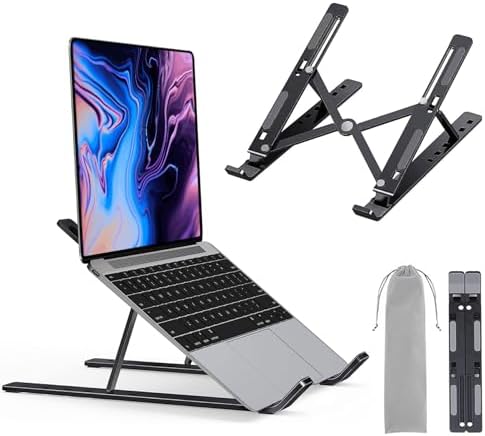
Portable laptop riser with 6-angle adjustment, fits 10-15.6 inch laptops, lightweight foldable design
£6.97
Price accurate as of 2026-06-25
Check Price on Amazon →Lamicall Adjustable Laptop Stand
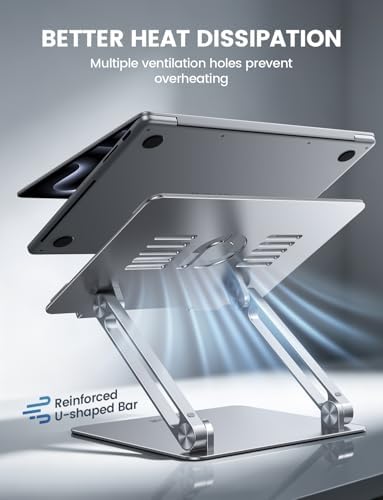
Aluminum adjustable laptop riser with ergonomic height and angle adjustment, fits 10-17.3 inch laptops
£25.99
Price accurate as of 2026-06-25
Check Price on Amazon →Small Space Living is reader-supported. When you buy through links on our site, we may earn an affiliate commission from Amazon Associates and other affiliate programs. As an Amazon Associate we earn from qualifying purchases.
Prices and availability are accurate as of the date/time indicated and are subject to change. Any price and availability information displayed on Amazon at the time of purchase will apply to the purchase of this product.