The Best Laptop Stands for Small Desks in 2026
Disclosure: This post contains affiliate links. As an Amazon Associate I earn from qualifying purchases. Learn more.
If you're working from a small flat, a studio, or a cramped university digs in the UK, you know the struggle: a tiny desk with barely enough room for your laptop, let alone a monitor, a coffee mug, and that stack of notes. Your laptop sits flat on the desk, you hunch over it, and within an hour your neck is screaming. The fix is simpler and cheaper than you think — a laptop stand.
A good laptop stand raises your screen to eye level, freeing up desk space underneath and fixing that awful ergonomic posture that comes with staring down at a 13-inch screen. Whether you're a student in a London studio or a remote worker in a Manchester flat, a laptop stand is the single most cost-effective upgrade you can make to your small desk setup.
In this guide, we'll look at what to look for in a laptop stand for small spaces, and the best options available on Amazon UK right now.
Why You Need a Laptop Stand in a Small Space
When your desk is small, every square centimetre counts. A laptop sitting flat takes up the entire usable surface — your keyboard, mouse, and notes have to fight for the remaining space. A laptop stand lifts your machine up, creating room underneath to stow your keyboard when you're typing, or to slide notebooks and reference materials.
But the real benefit is ergonomic. The NHS recommends that the top of your screen should be at or slightly below eye level when you're sitting upright. A laptop on a desk puts the screen way too low, forcing you to crane your neck forward. Over time, this leads to "tech neck" — a genuine problem that causes headaches, shoulder pain, and even long-term spinal issues. A riser fixes this almost instantly.
For small spaces specifically, you also want a stand that doesn't add bulk. The best laptop stands for compact desks are lightweight, foldable (so you can stow them away when not in use), and designed with ventilation to stop your laptop from overheating on those long work sessions.
What to Look For in a Small-Desk Laptop Stand
Size and Footprint
A laptop stand meant for a small desk should have a smaller base than the laptop itself, or at least not extend beyond it. Look for stands with an open-frame design rather than solid platforms — they take up less visual space and allow better airflow.
Adjustability
Not all stands are adjustable. Some offer fixed angles, while others let you tilt or raise the height. For a compact desk, a stand with multiple angle settings lets you switch between typing mode and presentation mode without having to move your whole setup.
Portability
If you live in a small flat, you might work from the kitchen table in the morning and the sofa in the afternoon. A foldable, lightweight stand makes that easy. The best portable laptop stands weigh under 500g and collapse flat enough to slide into a laptop bag.
Build Quality
Cheap plastic stands can wobble, especially on uneven surfaces. Look for aluminium or reinforced ABS construction. A sturdy stand keeps your laptop stable, which matters even more on a small desk where everything is close together.
Ventilation
Laptops generate heat, especially when you're running multiple apps. A stand with an open or perforated design allows air to circulate underneath, keeping your machine cooler and your fans quieter. This is a big deal in small flats where you're already dealing with limited airflow.
Best Budget Pick: Amazon Basics Laptop Stand
Let's start with the most affordable option — and honestly, one that punches way above its weight. The Amazon Basics Laptop Stand with 6-Angle Adjustment costs just £6.97, making it one of the cheapest laptop risers on Amazon UK.
Don't let the price fool you. This stand offers six adjustable angles, so you can find the perfect viewing position whether you're typing or watching content. It fits laptops from 10 to 15.6 inches, which covers the vast majority of machines students and remote workers use. The foldable design means it collapses flat — perfect for sliding into a drawer or a bag when your desk needs to double as a dining table.
The build is lightweight but sturdy enough for everyday use. The open design promotes airflow, and the rubber grips on both the stand and the laptop surface prevent slipping. At under £7, it's almost a no-brainer for anyone setting up a small home office on a budget.
Who it's for: Students, first-time remote workers, or anyone on a tight budget who needs a quick ergonomic fix without spending much.
Pros: Incredibly affordable, six angle settings, lightweight and foldable, fits most laptops
Cons: Fixed-angle only (no height adjustment), plastic construction, not ideal for heavy laptops
Best All-Rounder: Lamicall Adjustable Laptop Stand
If you want something a step up in build quality and ergonomics, the Lamicall Adjustable Laptop Stand at £25.99 is widely considered the best all-rounder for small desks.
This stand is made from aluminium, which gives it a premium feel and excellent heat dissipation. It's adjustable in both height and angle, offering six different viewing positions. The open镂空 design (essentially a series of bars rather than a solid platform) means air flows freely underneath your laptop — your fans will thank you during those long editing sessions or Zoom-heavy workdays.
At 680g, it's still light enough to move around your flat, but sturdy enough to hold laptops up to 17.3 inches. The anti-slip silicone pads on both the stand and the base keep everything firmly in place, even on smooth surfaces like a glass desk or a kitchen counter.
The real selling point for small spaces is the compact footprint. The stand is only marginally wider than a 13-inch laptop, so it won't eat into your precious desk real estate. The slotted design also makes cable management easy — you can route your charging cable through the stand rather than having it snake across your desk.
Who it's for: Remote workers, gamers, and anyone who wants a premium-feeling stand that'll last years. Great if you switch between sitting and standing during the day.
Pros: Premium aluminium build, excellent ventilation, adjustable height and angle, compact footprint
Cons: Pricier than basic options, no built-in cable management channels
How to Set Up Your Laptop Stand for Best Ergonomics
Once you've picked a stand, getting the setup right is key. Here's a quick checklist for small desk ergonomics:
- Eye level: The top of your laptop screen should be at or just below eye level. If your stand doesn't raise it high enough, place a sturdy book underneath.
- External keyboard: When your laptop is raised, you'll likely need a separate keyboard and mouse to type comfortably. Even a basic wireless keyboard makes a huge difference.
- Distance: Your screen should be about an arm's length away. On a small desk, this might mean pushing the stand to the back edge — which is exactly what a good stand enables.
- Cable management: Use the space under the stand to route charging cables and USB hubs. A few adhesive cable clips can keep everything tidy.
Buying Guide
When choosing a laptop stand for your small UK flat or student accommodation, here's what to prioritise:
First, measure your laptop. Most stands fit 10-15.6 inch laptops, but some extend to 17.3 inches. Check the dimensions before buying.
Second, decide on portability. If you move your workspace around your flat (kitchen table → desk → sofa), a foldable stand like the Amazon Basic is ideal. If your desk is fixed, a sturdier aluminium stand like the Lamicall is worth the investment.
Third, think about airflow. Solid-platform stands trap heat. Open-frame or slotted designs keep your laptop cool. This matters more in small flats where ambient temperatures can rise quickly.
Fourth, set a budget. You can get a perfectly good laptop stand for under £10 (Amazon Basics at £6.97). If you want aluminium construction and height adjustability, expect to pay £20-30 (Lamicall at £25.99). There's not much reason to go above £30 for a laptop stand — beyond that, you're paying for branding more than function.
Fifth, check the weight capacity. Most stands handle 4-5kg, which covers every mainstream laptop. But if you're using a chunky gaming laptop, double-check.
FAQ
Will a laptop stand work with a MacBook?
Yes. Both the Amazon Basics and Lamicall stands work perfectly with MacBook Air and MacBook Pro models. The open designs are particularly good for MacBooks, which dissipate heat through their chassis.
Can I use a laptop stand with a tablet?
Absolutely. If you use an iPad or Android tablet for note-taking or light work, a laptop stand is actually ideal — it lifts the screen to a viewing angle that makes typing on a separate keyboard much more comfortable.
Do I need an external keyboard with a laptop stand?
Not strictly necessary, but highly recommended. When your laptop is raised to eye level, typing on the built-in keyboard becomes awkward — your arms are at an upward angle. A separate keyboard at desk level lets your arms rest naturally.
Will a laptop stand damage my desk?
No. Quality stands have rubber or silicone pads on the base that protect your desk surface. Both the Amazon Basics and Lamicall stands include non-slip padding.
Can I close my laptop while it's on a stand?
If your stand has enough clearance — and most open-frame ones do — you can close your laptop and use it in clamshell mode with an external monitor. This is a great way to save even more space on a tiny desk.
How much desk space does a laptop stand actually save?
A good stand lifts your laptop off the desk, freeing up the entire area underneath. On a 60cm x 40cm desk (common in student accommodation), that's roughly a third of your total workspace reclaimed. It's transformative.
Top Picks from This Article
We earn a commission if you make a purchase, at no additional cost to you.
Amazon Basics Laptop Stand with 6-Angle Adjustment
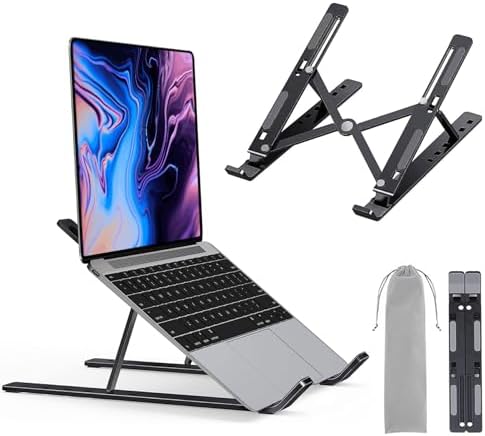
Portable laptop riser with 6-angle adjustment, fits 10-15.6 inch laptops, lightweight foldable design
£6.97
Check Price on Amazon →Lamicall Adjustable Laptop Stand
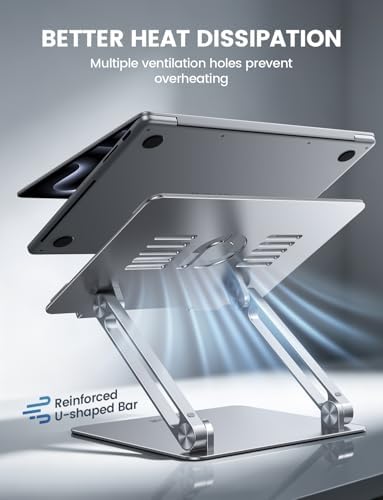
Aluminum adjustable laptop riser with ergonomic height and angle adjustment, fits 10-17.3 inch laptops
£25.99
Check Price on Amazon →Small Space Living is reader-supported. When you buy through links on our site, we may earn an affiliate commission from Amazon Associates and other affiliate programs. As an Amazon Associate we earn from qualifying purchases.
Prices and availability are accurate as of the date/time indicated and are subject to change. Any price and availability information displayed on Amazon at the time of purchase will apply to the purchase of this product.