The Best Monitor Arms for Small Desks in 2026
Disclosure: This post contains affiliate links. As an Amazon Associate I earn from qualifying purchases. Learn more.
Working from a small desk in a UK flat, studio, or university digs means every square inch counts. Your monitor takes up precious surface space — and if it's sitting on the factory stand, you're losing a huge chunk of your already-limited real estate. A monitor arm frees up that desk space, improves your posture, and makes your tiny workspace feel much bigger.
In this guide, we'll look at the best monitor arms for small desks in 2026, covering what to look for, which models deliver the most bang for your buck, and how to pick the right one for your setup.
Why You Need a Monitor Arm in a Small Space
If your desk is 100cm or smaller — very common in UK student accommodation and studio flats — a monitor's bulky stand can eat up 25cm of depth all by itself. That leaves barely any room for a keyboard, notebook, or coffee.
A monitor arm solves this by clamping to the back or edge of your desk and suspending your screen above the surface. You instantly reclaim that space. Plus you can adjust the height, tilt, and distance to find a comfortable viewing position — crucial if you're working at your desk for several hours a day.
The key benefits for small-space dwellers:
- Frees up desk surface — your monitor floats above the desk, not on it
- Improves ergonomics — adjust screen height to eye level, reducing neck and back strain
- Creates hidden storage — tuck keyboards, notebooks, or a laptop stand underneath the raised screen
- Cable management — most arms have built-in cable routing channels to keep wires tidy
What to Look for in a Monitor Arm for Small Desks
Not all monitor arms are created equal, and for small desks you need to be picky. Here's what matters most:
Desk Clamp Compatibility: Most arms use a C-clamp that screws onto the back edge of your desk. Check your desk thickness — most clamps work with 10–50mm desks, which covers standard desks and many standing desk converters. Some also offer a grommet mount option if your desk has a cable hole.
Weight and Size Range: Your monitor arm must support your screen's weight and VESA pattern. Almost all modern monitors use the 75×75mm or 100×100mm VESA standard. If you're unsure, check the back of your monitor — it'll be engraved on the mounting plate. A good arm handles 2–9kg, covering most 22–34 inch screens.
Articulation: A full-motion arm lets you adjust height, tilt, swivel, and rotation. For small desks, the ability to push your monitor flat against the wall when you need extra workspace — and pull it forward when you're working — is invaluable.
Cable Management: Built-in cable routing keeps your desk looking clean. Even the best monitor arm loses points if you have to zip-tie cables to the outside.
Build Quality: Look for gas-spring arms rather than friction-based ones. Gas springs maintain consistent tension over years of use and make adjustment effortless.
Price: Budget home office gear in the UK can deliver excellent value. The best monitor arms under £30 perform just as well as premium brands for the vast majority of desk setups.
Top Monitor Arm Recommendations
ErGear Single Monitor Arm — £28.48
The ErGear Single Monitor Arm is the standout choice for anyone setting up a small-space home office on a budget. It's a gas-spring arm that supports screens from 13 to 34 inches and up to 9kg — comfortably covering everything from a compact ultra-wide to a standard 27-inch monitor.
Key features:
- Tool-free VESA installation — mounts in minutes without searching for Allen keys
- Full motion articulation — +45° to -45° tilt, 180° swivel, 360° rotation, and height adjustment via gas spring
- C-clamp and grommet mount included — works with desks up to 50mm thick
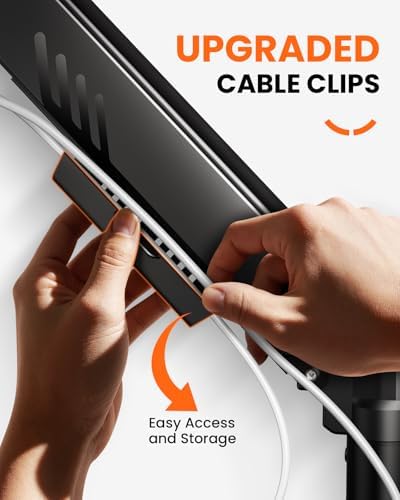
- Built-in cable management — channels keep cables hidden inside the arm
- 9kg capacity — handles large monitors with ease
For small desks, the ErGear shines because its gas spring holds your monitor at any height without drifting. You can raise the screen high enough to slip a laptop or notebook underneath, or push it flat against the wall when you need clear desk space for writing or crafting.
At £28.48, it's hard to beat. If you're furnishing a first flat or uni room and need one arm that just works for years, this is it.
HUANUO Single Monitor Arm — £25.99
The HUANUO Single Monitor Arm is another excellent budget option that gives the ErGear serious competition. It supports 13–32 inch monitors with a 8kg weight capacity — slightly less than the ErGear, but still plenty for most screens under 29 inches.
Key features:
- Gas spring lift mechanism — smooth height adjustment with consistent tension
- Clamp and grommet mounting options — fits desks from 10–50mm thick
- Full articulation — tilt, swivel, and 360° rotation
- Integrated cable clips — keeps wires organised along the arm
- Quick-release VESA plate — pre-mount the plate, then snap the screen on
What we like about the HUANUO for small workspaces is its sleek, low-profile design. The arm hugs the back of the desk tighter than most, meaning it protrudes less — ideal when you're working right up against a wall. The quick-release VESA plate also makes it easy to take your monitor down if you need to move it to a different spot in your flat.
At £25.99, it's actually the cheapest option on our list while still delivering genuine gas-spring performance. For students and renters on a tight budget, this is a fantastic choice.
Monitor Arm Comparison
| Feature | ErGear Single Monitor Arm | HUANUO Single Monitor Arm |
|---|---|---|
| Price | £28.48 | £25.99 |
| Screen Size | 13–34 inches | 13–32 inches |
| Weight Capacity | 9kg | 8kg |
| Mount Options | C-clamp + Grommet | C-clamp + Grommet |
| Gas Spring | Yes | Yes |
| Cable Management | Built-in channels | Integrated clips |
| VESA Compatibility | 75×75mm, 100×100mm | 75×75mm, 100×100mm |
Both are excellent arms, and you honestly can't go wrong with either. The ErGear edges ahead for larger or heavier monitors, while the HUANUO is slightly more compact and a few pounds cheaper.
Buying Guide
How to Choose the Right Monitor Arm
Step 1: Check Your Monitor
Flip your monitor over and look for four screw holes in a square pattern. Measure the distance between them — 75mm or 100mm are standard. Note the weight too (check the specs or look on the back sticker). Most arms support 75×75 and 100×100 VESA, but your monitor needs to be under the arm's weight limit.
Step 2: Measure Your Desk
For small desks, depth and edge accessibility matter. Measure your desk thickness — if it's under 50mm, both the ErGear and HUANUO will fit. If your desk has a framed edge or an uneven underside, check that the clamp can still grip firmly.
Step 3: Decide on Movement
Do you need full articulation? For most small-space setups, yes — being able to push the monitor back, pull it forward, and adjust height throughout the day makes a big difference. Both arms recommended here offer full motion.
Step 4: Consider Your Setup
If you use a laptop alongside your monitor, a monitor arm gives you the space to slide a laptop stand underneath. Pair it with the Amazon Basics Laptop Stand (£6.97) or Lamicall Adjustable Laptop Stand (£25.99) and you've got a complete dual-screen ergonomic workspace on the smallest of desks.
Common Mistakes to Avoid
- Buying an arm that can't support your monitor's weight — check this first. The HUANUO's 8kg limit covers most screens, but heavy 32-inch monitors may need the ErGear's 9kg capacity.
- Not accounting for desk thickness — some ultra-thin standing desks are under 10mm, while thick wooden desktops can exceed 50mm. Both arms here cover the 10–50mm range, so measure first.
- Forgetting about cable management — an arm without cable channels means visible wires dangling below your monitor. Both recommended arms include routing solutions.
- Buying a dual arm when you only need one — if you use a single monitor (or a laptop + monitor), a single arm is all you need and takes up less desk edge space.
Price Ranges
For small desk setups, there's rarely a reason to spend over £50 on a monitor arm. The sweet spot is £25–£30, where gas-spring arms from ErGear and HUANUO deliver reliable performance. Spending more usually gets you extra reach or better aesthetics, but not better ergonomics for standard monitor sizes.
FAQ
Do monitor arms work with all desks?
Most monitor arms use a C-clamp that requires a flat desk edge 10–50mm thick. If your desk has a thick frame or a glass top, check the clamp compatibility. Both the ErGear and HUANUO include grommet mounts as an alternative.
Will a monitor arm damage my desk?
A properly fitted C-clamp won't damage your desk. The clamp pads are rubberised to protect the surface. Just don't overtighten — hand-tight is sufficient. If you're worried, place a thin cloth between the clamp and your desk.
Can I use a monitor arm with a standing desk converter?
Yes, but with a caveat. Some desk converters have a raised platform that the clamp needs to grip. Check that the converter's platform is at least 10mm thick and has a clear edge for the clamp. The VIVO 26 inch and VIVO 36 inch desk converters work well with both arms listed here.
How do I know if my monitor is VESA compatible?
Look at the back of your monitor for four screw holes arranged in a square. If they're 75mm or 100mm apart, your monitor is VESA compatible. Most monitors from the last decade support this standard. If yours doesn't, you can buy a VESA adapter bracket separately.
Is one monitor arm better than two separate arms for small desks?
If you use two monitors, two separate single arms (like two ErGear arms) offer more flexibility than a single dual-arm mount. Each screen can be positioned independently, which is especially useful when space is tight and you need to angle screens differently.
How long does installation take?
Both the ErGear and HUANUO arms install in under 15 minutes. You'll need to attach the desk clamp, mount the VESA plate to your monitor, snap the screen onto the arm, and route your cables. No special tools are needed — both arms are tool-free for the VESA installation.
Final Thoughts
A monitor arm is one of the best investments you can make for a small desk setup. It frees up surface space, improves your working posture, and makes your whole desk feel more organised.
For the vast majority of UK small-space dwellers, we recommend the ErGear Single Monitor Arm (£28.48) — it has the highest weight capacity, best cable management, and works with the widest range of monitors. If budget is tighter or you prefer a slightly more compact design, the HUANUO Single Monitor Arm (£25.99) is an outstanding alternative that gives up very little for a lower price.
Whichever you choose, you'll reclaim your desk space and wonder why you didn't buy one sooner.
Top Picks from This Article
We earn a commission if you make a purchase, at no additional cost to you.
ErGear Single Monitor Arm
Fully adjustable gas-spring monitor mount for 13-34 inch screens, tool-free VESA, 9kg capacity
£28.48
Check Price on Amazon →HUANUO Single Monitor Arm

Gas spring single monitor arm for 13-32 inch screens, C-clamp and grommet mount, frees up small desk space
£25.99
Check Price on Amazon →Small Space Living is reader-supported. When you buy through links on our site, we may earn an affiliate commission from Amazon Associates and other affiliate programs. As an Amazon Associate we earn from qualifying purchases.
Prices and availability are accurate as of the date/time indicated and are subject to change. Any price and availability information displayed on Amazon at the time of purchase will apply to the purchase of this product.