The Best Budget Monitor Arms for Tiny UK Desks in 2026
Disclosure: This post contains affiliate links. As an Amazon Associate I earn from qualifying purchases. Learn more.
If you live in a flat, studio or uni digs, your desk is probably doing triple duty as a workspace, dining table and general dumping ground. The quickest way to claw back a surprising amount of surface area — and save your neck at the same time — is to get your monitor off the desk and onto an arm. A decent monitor arm lifts your screen to eye level, frees up the space underneath for a keyboard, notebook or coffee, and makes a cramped corner feel far more organised. The best news? You don't need to spend a fortune. Two of the best budget options we've tested for small UK desks are the ErGear Single Monitor Arm and the HUANUO Single Monitor Arm, both priced comfortably under £30.
Why Your Tiny UK Desk Needs a Monitor Arm
Desk space in a small flat is precious. A monitor stand takes up real estate, but a monitor arm uses zero surface area — the clamp attaches to the back edge of your desk and holds the screen in mid-air. That instantly gives you back the strip of desk where your monitor base used to sit, which is exactly where you rest your wrists when typing. For anyone working from a small bedroom desk or a fold-down studio table, that extra few inches makes a genuine difference.
There's an ergonomics win too. Most laptop and monitor bases force the screen too low, which means you hunch forward to look at it. An arm lets you position the top of the screen at or just below eye level, roughly an arm's length away, which is the position physios recommend for long working days. You can also tilt, swivel and rotate your screen between landscape and portrait — handy for coding, spreadsheets or reading long documents — and swing the monitor out of the way when you want the desk for something else.
ErGear Single Monitor Arm — The Best All-Rounder
The ErGear Single Monitor Arm (£28.48) is the arm we'd recommend to most people with a small UK desk. It's a fully adjustable gas-spring mount that handles screens from 13 to 34 inches, which covers everything from a compact 24-inch office monitor right up to a 34-inch ultrawide. With a 9kg capacity, it has more than enough strength for the vast majority of monitors you'd find in a home office.
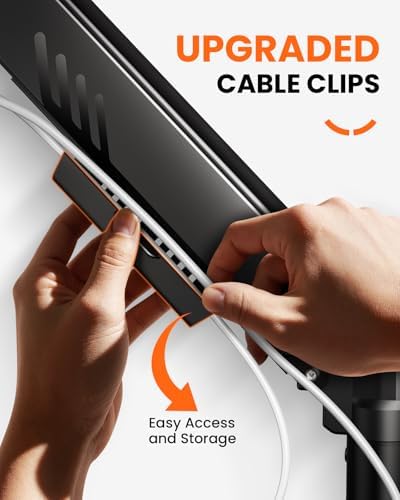
The standout feature here is the tool-free VESA fitting: you screw the plate to the back of your monitor once, then click it straight onto the arm — no spanners or screwdrivers needed when you're setting it up. The gas spring means once you've positioned the arm, it stays exactly where you put it, with no sagging over time. It also comes with a neat cable management channel, which is a small thing until you realise how much tidier your desk looks with the power and HDMI cables tucked out of sight.
In a small space, the ErGear shines because it mounts with either a C-clamp or a grommet fitting, so you can attach it to the back edge of a desk or thread it through an existing cable hole if you have one. It's sturdy, looks smart, and at £28.48 it undercuts most comparable arms by a wide margin. If you only buy one thing for your home office this year, this is it.
HUANUO Single Monitor Arm — The Best Value Pick
If you're on a strict student budget or you're kitting out a second desk, the HUANUO Single Monitor Arm (£25.99) is an absolute bargain. It uses the same gas-spring mechanism and supports screens from 13 to 32 inches, with a C-clamp and grommet mount just like the ErGear, so it fits the same range of desks.
Where the HUANUO really wins is price. At under £26, it's one of the cheapest fully-adjustable gas-spring arms on Amazon UK, yet it still gives you full height adjustment, tilt, swivel and 360-degree rotation. That means you can position your screen in portrait for reading or in landscape for general work, and push it flat against the wall when the desk needs to be clear. Setup takes about ten minutes, and the clamp is padded, so you don't need to worry about it marking a nice desk surface.
The only real compromise is that the arm is designed for monitors up to 32 inches rather than 34, and the cable routing is a little more basic than the ErGear's — you'll want a couple of cable ties to keep things neat. For a first arm, a student room, or a guest desk in a spare corner, the HUANUO is hard to beat at £25.99.
ErGear vs HUANUO: Which One Should You Choose?
Both arms are excellent for small desks, so the choice comes down to your monitor size and how much you value extra polish. Here's the quick comparison:
| Feature | ErGear Single Monitor Arm | HUANUO Single Monitor Arm |
|---|---|---|
| Price | £28.48 | £25.99 |
| Screen size | 13–34 inches | 13–32 inches |
| Weight capacity | 9kg | 8kg (typical gas-spring range) |
| Mounting | C-clamp and grommet | C-clamp and grommet |
| Adjustment | Height, tilt, swivel, rotation | Height, tilt, swivel, rotation |
| Cable management | Built-in channel | Basic, use ties |
Choose the ErGear if you have a larger monitor (up to 34 inches), want the tidier integrated cable channel, or you're planning to upgrade your screen in the future. Choose the HUANUO if you want the cheapest fully-adjustable arm possible and your monitor is 32 inches or smaller — the £2.49 saving buys you a coffee, and honestly not much else separates them in daily use.
Buying Guide
Before you buy a monitor arm for a small desk, check these five things:
- VESA compatibility. Nearly all modern monitors have a 75x75mm or 100x100mm VESA mounting pattern on the back. Look for the holes on your monitor first — if they're there, any of the arms above will fit. If your monitor doesn't have VESA holes, you'll need a VESA adapter plate, so factor that into your budget.
- Weight and screen size. Arms have stated limits for a reason. Weigh your monitor (or check the spec sheet) and make sure it's comfortably under the arm's capacity. The ErGear handles up to 9kg and 34 inches; the HUANUO suits monitors up to 32 inches.
- Clamp vs grommet. Most arms come with both. A C-clamp grips the back edge of the desk, while a grommet mount threads through an existing cable hole. For a typical flat desk with no hole, the clamp is the simplest option — just make sure your desk edge is at least a couple of centimetres thick so the clamp grips properly.
- Gas spring vs fixed. A gas-spring arm lets you adjust height freely and holds position without tightening knobs. Fixed arms are cheaper but much less flexible. For a desk you use every day, the extra few pounds for a gas spring is worth it.
- Cable management. Look for an arm with a built-in channel or clips. Hiding the power and HDMI cables isn't just tidier — it stops cables snagging on your chair wheels and pulling the monitor over in a small room.
FAQ
Will a monitor arm fit my monitor?
Almost certainly, if your monitor has a VESA mount pattern on the back (75x75mm or 100x100mm are the standards). Check for four screw holes in a square on the back panel — if they're there, both the ErGear and HUANUO will fit, as long as your screen is within the arm's size and weight limits.
Is a single monitor arm enough, or do I need a dual arm?
For a small desk, a single arm is usually the right call. It frees up space and keeps things simple. If you genuinely need two screens side by side, two single arms actually give you more flexibility than a dual-arm mount, because you can position each screen independently and swing them away separately.
What's the difference between a C-clamp and a grommet mount?
A C-clamp grips the edge of your desk like a big vice, which is the easiest option for most desks. A grommet mount threads through a pre-existing cable hole and is sturdier if you have one. Both arms come with both fittings, so you can choose based on your desk.
Will a monitor arm damage my desk?
No — the clamps are padded and the arms are designed to attach without drilling (unless you choose the grommet option, which uses an existing hole). Just avoid clamping onto a very thin or hollow desk edge, and don't overtighten.
Can I use a monitor arm with a laptop?
Yes, but you'll need a laptop VESA mount or a tray that attaches to the arm's VESA plate. The arm itself works the same way — it just holds the tray instead of a monitor. That said, if your laptop is your main machine, a cheap laptop stand might be all you need, and a monitor arm really comes into its own with an external screen.
Top Picks from This Article
We earn a commission if you make a purchase, at no additional cost to you.
ErGear Single Monitor Arm
Fully adjustable gas-spring monitor mount for 13-34 inch screens, tool-free VESA, 9kg capacity
£28.48
Price accurate as of 2026-09-13
Check Price on Amazon →HUANUO Single Monitor Arm

Gas spring single monitor arm for 13-32 inch screens, C-clamp and grommet mount, frees up small desk space
£25.99
Price accurate as of 2026-09-13
Check Price on Amazon →Small Space Living is reader-supported. When you buy through links on our site, we may earn an affiliate commission from Amazon Associates and other affiliate programs. As an Amazon Associate we earn from qualifying purchases.
Prices and availability are accurate as of the date/time indicated and are subject to change. Any price and availability information displayed on Amazon at the time of purchase will apply to the purchase of this product.