The Best Standing Desk Converters for Tiny UK Desks in 2026
Disclosure: This post contains affiliate links. As an Amazon Associate I earn from qualifying purchases. Learn more.
If you work from a small flat, a studio or a uni room, the idea of swapping your desk for a full sit-stand model probably feels like a non-starter. Where would the old desk go? How do you fit a motorised frame into a corner that barely fits a 90cm table? The answer most people land on is a standing desk converter — a riser that sits on top of your existing desk and lifts your monitor and keyboard up when you want to stand, then drops back down when you want to sit.
They're one of the smartest upgrades for small-space working because they don't add any footprint. You keep the desk you already have, and the converter simply uses the vertical space above it. That matters when every square metre of floor space is accounted for. In this guide I've rounded up the best standing desk converters available on Amazon UK right now, with real prices, honest pros and cons, and a buying guide to help you pick the right one for your setup.
Why a Standing Desk Converter Beats a New Desk in a Small Space
There are three big reasons a converter makes more sense than a full sit-stand desk when you're short on space:
- No extra floor space needed. A converter sits on your current desk. A full sit-stand desk replaces furniture and needs clearance around it to move up and down.
- It's cheaper. Full sit-stand desks with decent motors start at £200-£300. Converters cost a fraction of that.
- You can take it with you. If you rent or move between uni halls and flats, a converter packs up and moves with you. Your landlord's desk stays put.
The trade-off is that a converter raises your keyboard and monitor as one unit, so you're standing at whatever height the top of your existing desk dictates. That's fine for most people — just be aware of it when measuring.
What to Look For in a Standing Desk Converter
Before we get to the recommendations, here are the specs that actually matter:
- Width and monitor capacity. Check the converter's width against your desk and count how many monitors you need to hold. A 26-inch unit handles a laptop plus one monitor; a 32-36 inch unit copes with two monitors side by side.
- Weight capacity. Add up the weight of your monitors, laptop and anything else on the top deck. Look for at least 10-15kg of rated capacity.
- Lift mechanism. Gas-spring lifts are smooth and stay put at any height. Some cheaper converters use a spring or latch system — fine, but check the adjustment range suits your height.
- Keyboard tray. The best converters keep your keyboard and mouse on a separate lower tray, so your arms stay at a comfortable angle whether you're sitting or standing.
- Height range. Ideally the converter's lowest setting sits at your normal seated typing height, and the highest setting brings the top deck to around elbow height when standing.
Best Overall: VIVO 26 Inch Desk Converter
The VIVO 26 inch Desk Converter (£129.99) is the sweet spot for most small desks. It's a height-adjustable sit-to-stand riser with dual monitor support and a wide keyboard tray. Despite the compact width, it can hold a laptop and a monitor (or two slim monitors) on the top deck, with plenty of room on the lower tray for your keyboard and mouse.
What makes it a great first converter is the gas-spring lift: it glides up and down smoothly and locks at the height you choose, so you're not fiddling with latches every time you switch position. The steel frame feels solid, and the tray is wide enough that you won't feel cramped even if your desk is only 100cm across.
It's best for: anyone with a standard 80-120cm desk who wants a reliable, no-fuss converter without spending over £150.
Best for Dual Monitors: VIVO 36 Inch Desk Converter
If your work needs two screens side by side, the VIVO 36 inch Desk Converter (£159.99) is the wider version of the same design. It's a wider height-adjustable stand-up desk riser built specifically for dual monitor setups, with the same ergonomic sit-stand action and a bigger top deck.
The extra width is the whole point here — it gives you a proper ergonomic workstation without forcing your monitors to overlap or hang off the edges. It still uses the same smooth gas-spring lift mechanism, and the keyboard tray is proportionally larger too. Just measure your desk first: at 36 inches wide, it needs a desk at least 100-120cm across to leave room for a mouse and your coffee mug.
It's best for: dual-monitor users, coders, traders and anyone whose desk setup involves more than one screen.
Best Value Alternative: BONTEC Standing Desk Converter 32 Inch
Sitting between the two VIVO options on price and width is the BONTEC Standing Desk Converter 32 inch (£139.99). It's a dual-tier height-adjustable converter with a gas-spring lift, a 15kg capacity, and enough room on the top deck for two monitors.
What BONTEC gets right is the balance: 32 inches is wide enough for most dual-monitor setups but a little less demanding on desk width than the 36-inch VIVO. The gas spring is smooth and the build is sturdy for the price. It also comes in slightly under the VIVO 36, making it a sensible middle pick if the 26-inch feels too small but the 36-inch feels like overkill.
It's best for: people with medium desks (100-120cm) who want dual-monitor support without paying the top price.
Don't Forget the Supporting Cast: Monitor Arms and Keyboard Trays
A converter gives you the height change, but two accessories can make the whole setup noticeably more comfortable in a small office.
Monitor arms free up the top deck of your converter by holding your screen slightly off the surface. The ErGear Single Monitor Arm (£28.48) is a fully adjustable gas-spring mount for 13-34 inch screens with tool-free VESA fitting and a 9kg capacity — a great match for a 26-inch converter. If you want to save a bit more, the HUANUO Single Monitor Arm (£25.99) does the same job for 13-32 inch screens with a C-clamp or grommet mount. Either one lifts the monitor off the converter deck, giving you more room for a notebook or a second device.
Keyboard trays matter if you find the converter's built-in tray isn't quite at the right height. The VIVO Large Under Desk Keyboard and Mouse Tray (£47.99) is a 68x28cm clamp-on tray with 12 height settings — useful if you want your keyboard lower than the main deck while standing. For a more compact option, the VIVO Adjustable Keyboard and Mouse Platform Tray (£44.99) offers a similar clamp-on design with a dedicated mouse platform.
Buying Guide
Here's a simple way to decide:
- Measure your desk. Width is the number-one constraint. A 26-inch converter needs roughly an 80-100cm desk; 32-36 inch converters need 100-120cm+. Leave a little breathing room on each side.
- Count your screens. One laptop or a single monitor → 26-inch. Two monitors → 32 or 36-inch.
- Check your height. When standing, the top deck should sit around elbow height. If you're very tall or very short, check the converter's maximum and minimum heights against your measurements rather than assuming it'll suit you.
- Weigh your gear. Add up monitors, laptop, desk lamp and whatever else lives on the top deck, and make sure you're inside the rated capacity with margin to spare.
- Think about how you'll switch. Gas-spring lifts make it effortless to alternate between sitting and standing throughout the day — which is the whole point of buying a converter in the first place.
Common mistake to avoid: buying a converter that's wider than your desk, or one that's too narrow for your monitors to sit comfortably. Both kill the ergonomic benefit. Measure twice, order once.
FAQ
Are standing desk converters worth it?
Yes, if you already have a desk you like and just want the option to stand. They're dramatically cheaper than a full sit-stand desk and take up no extra floor space — ideal for flats, studios and uni digs.
Will a converter fit my desk?
Check the width of the converter against your desk. A 26-inch model fits most standard desks; 32-36 inch models need a desk of at least 100-120cm. Also check that your desk has a stable, level surface and enough depth for the base to sit securely.
Can a converter hold two monitors?
Yes — but choose the right size. The VIVO 36 inch Desk Converter and the BONTEC Standing Desk Converter 32 inch are both designed for dual-monitor setups. The 26-inch VIVO is better suited to a laptop plus one monitor.
How heavy can the top deck be?
Check each product's rated capacity. The BONTEC 32-inch converter is rated at 15kg, and the ErGear monitor arm carries up to 9kg per screen. Add up the weight of your equipment before you buy.
Do I need a monitor arm as well?
Not strictly, but it helps. Mounting your screen on an arm like the ErGear Single Monitor Arm frees up space on the converter's top deck and makes it easier to position the screen at eye level.
Are these converters easy to install?
Yes. Converters sit on top of your desk with no drilling or fixing required — just lift them into place. Accessories like monitor arms and keyboard trays use clamps, so they're equally renter-friendly.
Top Picks from This Article
We earn a commission if you make a purchase, at no additional cost to you.
ErGear Single Monitor Arm
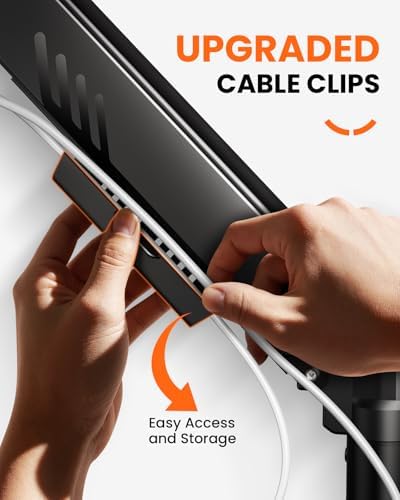
Fully adjustable gas-spring monitor mount for 13-34 inch screens, tool-free VESA, 9kg capacity
£28.48
Price accurate as of 2026-09-11
Check Price on Amazon →HUANUO Single Monitor Arm

Gas spring single monitor arm for 13-32 inch screens, C-clamp and grommet mount, frees up small desk space
£25.99
Price accurate as of 2026-09-11
Check Price on Amazon →Small Space Living is reader-supported. When you buy through links on our site, we may earn an affiliate commission from Amazon Associates and other affiliate programs. As an Amazon Associate we earn from qualifying purchases.
Prices and availability are accurate as of the date/time indicated and are subject to change. Any price and availability information displayed on Amazon at the time of purchase will apply to the purchase of this product.