The Best Budget Monitor Arms and Laptop Stands for Small UK Desks in 2026
Disclosure: This post contains affiliate links. As an Amazon Associate I earn from qualifying purchases. Learn more.
If you're working from a compact desk in a studio flat or university digs, every centimetre of surface space counts. One of the smartest upgrades you can make is elevating your screens — both your monitor and laptop — off the desk top. Not only does this free up valuable room for your coffee mug, notebook, or that inevitable pile of post-its, but it also improves your posture and reduces neck strain.
The good news? You don't need to spend a fortune. There are excellent budget-friendly monitor arms and laptop stands available on Amazon UK that transform a cramped workspace into an ergonomic, organised setup. In this guide, we'll walk through the best options under £30 — practical picks that work for small desks, awkward corners, and tight budgets.
Why Elevating Your Screens Matters in a Small Space
When your monitor sits flat on the desk, your eyeline naturally falls below the recommended level. Over time, you'll find yourself slouching or craning your neck forward — a fast track to tension headaches and sore shoulders. A monitor arm lets you raise the screen to eye level and tilt it to reduce glare, all while reclaiming the footprint the stand was taking up.
The same goes for laptops. A laptop stand angles the keyboard for more comfortable typing and lifts the screen closer to eye level. If you're working on the dining table or a tiny IKEA desk, an adjustable stand tucks away when not in use and costs less than a takeaway dinner.
Choosing the Right Monitor Arm for Your Small Desk
Not all monitor arms are created equal. For a small UK home office or student room, you need a compact arm that doesn't overhang the edges of your desk or require heavy-duty clamping into flimsy furniture. Look for gas-spring mechanisms (smoother adjustment), a VESA-compatible plate, and a weight rating that matches your screen.
ErGear Single Monitor Arm — £28.48
The ErGear Single Monitor Arm is a standout choice for small desks. It supports screens from 13 to 34 inches and carries up to 9 kg, which covers virtually any monitor you'd have in a compact home office. The gas-spring mechanism means you can adjust height, tilt, and rotation with one hand — no tools needed. It installs via a C-clamp or grommet mount, so it works on desks with a built-in cable hole as well as solid desktops.
At £28.48, it's more affordable than many comparable arms and packs a 9 kg capacity that rivals pricier models. The build quality is robust: the aluminium arm feels substantial, and the cable management channels keep your desk tidy. For anyone with a 24-inch or 27-inch monitor on a 100 cm desk, this arm frees up a surprising amount of space.
HUANUO Single Monitor Arm — £25.99
If you're on a tighter budget, the HUANUO Single Monitor Arm delivers similar features for just under £26. It's rated for 13 to 32-inch screens and uses a gas spring for smooth height adjustment. The C-clamp and grommet mounting options are the same as the ErGear, and it also includes a VESA plate (75x75 mm and 100x100 mm compatible).
Where the HUANUO differs is in its slightly lower price and simpler visual design. The arm is fully articulated, so you can push the monitor back against the wall when not in use — brilliant for shallow desks. The cable clips are basic but effective. If you're equipping a student room or a temporary WFH setup and want solid ergonomics without the premium price tag, this is a genuinely excellent choice.
Laptop Stands: Cheap, Effective, and Space-Saving
A laptop stand is one of the most cost-effective ergonomic upgrades you can make. Even a basic riser improves airflow around your laptop (keeping it cooler under load) and angles the keyboard for more comfortable typing. In a small flat, a stand that folds flat or stows away easily is ideal.
Amazon Basics Laptop Stand with 6-Angle Adjustment — £6.97
Yes, you read that right — £6.97. The Amazon Basics Laptop Stand is almost unbelievably affordable for what it does. It's a foldable aluminium riser that fits laptops from 10 to 15.6 inches, with six preset angle adjustments. The surface is ventilated to help with cooling, and rubber grips on the base and top prevent slipping.
At this price, you might expect flimsy construction, but the stand is genuinely sturdy for everyday use. It folds flat enough to slide into a laptop bag, making it perfect for students who move between the library, lecture hall, and their room. If you're on an ultra-tight budget, start here — you can always upgrade later. The value is almost unmatched.
Lamicall Adjustable Laptop Stand — £25.99
If you want more adjustability and a sturdier aluminium build, the Lamicall Adjustable Laptop Stand is a step up. It supports laptops from 10 to 17.3 inches and offers continuous height adjustment (not just preset angles), plus a 180-degree rotation that lets you switch between landscape and portrait orientation.
The open-frame design promotes airflow — helpful if you're running creative software or gaming on a laptop. The base is wide and stable, and silicone pads keep everything in place. At £25.99, it's a significant step up from the Amazon Basics option, but you're paying for the extra flexibility and more premium materials. It's the right choice if your laptop is your primary machine and you spend hours at it daily.
How to Set Up Your Small Desk for Maximum Space
Once you've got your monitor arm and laptop stand, a little planning goes a long way. Here's a quick checklist for small desk optimisation:
- Mount the monitor first. Push it to the far back or corner of the desk so the arm keeps it positioned without eating into your work zone.
- Place the laptop stand to one side. If you use your laptop as a secondary screen, angle it beside the monitor on the stand. If it's your main machine, centre it.
- Tuck cables away. Both the ErGear and HUANUO arms have built-in cable routing. Combine them with a basic cable management tray or reusable VELCRO ties to keep the desk clear.
- Use the reclaimed space. The area your monitor used to sit on is now free for a compact desk lamp like the TaoTronics LED Clamp Lamp or a small notepad and pen pot.
Buying Guide
For monitor arms: Always check your monitor's VESA compatibility (most modern screens are 75x75 mm or 100x100 mm) and weight. The ErGear arm's 9 kg capacity covers the vast majority of 24–32 inch monitors. If your desk has a thick edge or glass top, the grommet mount option is safer than a clamp.
For laptop stands: Consider how portable you need it to be. The Amazon Basics stand is ideal for students who carry their setup between rooms. The Lamicall stand is better suited to a permanent desk position where you want full adjustability.
Don't overbuy for your space. A 100 cm desk doesn't need a heavy-duty dual-arm rig. A single arm and a basic laptop riser will give you 80% of the ergonomic benefit at 20% of the cost.
FAQ
Can a monitor arm hold my 32-inch TV? Most single arms, including the ErGear and HUANUO, support up to 32 inches — but check the weight rating first. A 32-inch TV often exceeds 9 kg, so you'd need a heavy-duty arm.
Will a laptop stand fit my 17-inch gaming laptop? The Lamicall stand accommodates up to 17.3 inches. The Amazon Basics stand maxes out at 15.6 inches, so it won't fit larger gaming laptops.
Do I need to drill holes to install a monitor arm? No. Both the ErGear and HUANUO arms use a C-clamp (clamps onto the desk edge) or grommet mount (through an existing cable hole). No drilling is required.
Can I use both a monitor arm and a laptop stand together on a small desk? Absolutely. Mount the monitor on the arm and place your laptop on the stand beside it. This gives you a dual-screen setup that takes up less desk space than two separate monitor stands.
Is a £6.97 laptop stand worth buying? Yes. The Amazon Basics stand is surprisingly well-made for the price. It's lightweight, portable, and does the job. It's the perfect entry-level option for students or anyone starting their WFH setup on a shoestring budget.
Are gas-spring monitor arms better than fixed arms? For most people, yes. Gas-spring arms let you adjust height and tilt without loosening bolts, which is ideal for shared desks or when you alternate between sitting and standing.
Top Picks from This Article
We earn a commission if you make a purchase, at no additional cost to you.
Amazon Basics Laptop Stand with 6-Angle Adjustment
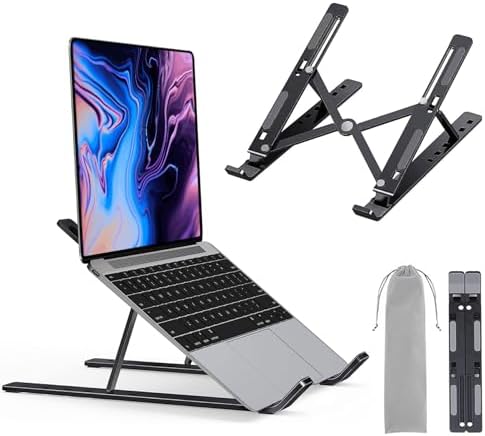
Portable laptop riser with 6-angle adjustment, fits 10-15.6 inch laptops, lightweight foldable design
£6.97
Price accurate as of 2026-10-21
Check Price on Amazon →Lamicall Adjustable Laptop Stand
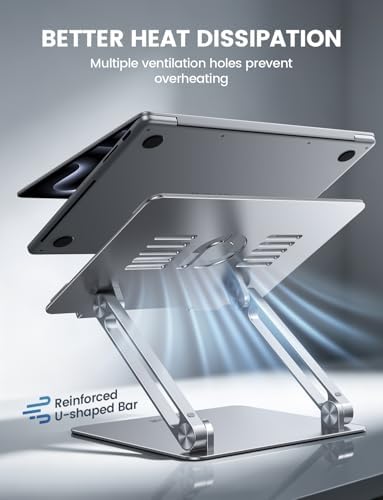
Aluminum adjustable laptop riser with ergonomic height and angle adjustment, fits 10-17.3 inch laptops
£25.99
Price accurate as of 2026-10-21
Check Price on Amazon →Small Space Living is reader-supported. When you buy through links on our site, we may earn an affiliate commission from Amazon Associates and other affiliate programs. As an Amazon Associate we earn from qualifying purchases.
Prices and availability are accurate as of the date/time indicated and are subject to change. Any price and availability information displayed on Amazon at the time of purchase will apply to the purchase of this product.