The Best Monitor Arms for Small UK Desks in 2026
Disclosure: This post contains affiliate links. As an Amazon Associate I earn from qualifying purchases. Learn more.
If you're working from a compact desk in a small flat, studio, or university digs, you've probably felt the squeeze. A monitor arm is one of the most effective upgrades you can make — it lifts your screen off the desk surface, frees up valuable workspace, and lets you position your monitor at the perfect ergonomic height. Whether you're in a cramped student bedroom or a bijou home office, a good monitor arm can transform your setup without costing a fortune.
In this guide, I've tested and compared the best budget-friendly monitor arms available on Amazon UK, looking at build quality, ease of installation, weight capacity, and how well they work on smaller desks. Let's find the right one for your space.
Why You Need a Monitor Arm for a Small Desk
A monitor arm does three crucial things for a small workspace:
Frees up desk space. The standard monitor stand takes up a huge footprint — typically 25cm deep and 30cm wide. A gas-spring arm clamps onto the edge of your desk, leaving the entire surface clear for your keyboard, notebook, and coffee mug.
Improves ergonomics. Raising your monitor to eye level reduces neck strain, which is essential when you're spending hours studying or working. Most budget arms offer tilt, swivel, and height adjustment.
Works with tiny desks. Many of us are working on desks as small as 80cm wide. A clamp-on monitor arm works perfectly on slim table tops and corner desks where a bulky stand won't fit.
The best part? You don't need to spend £100+. Some excellent options are available for well under £30.
The Best Budget Monitor Arms for Small UK Desks
1. ErGear Single Monitor Arm — £28.48
The ErGear Single Monitor Arm is our top pick for small UK desks, and it's easy to see why. This gas-spring arm supports monitors from 13 to 34 inches and handles up to 9kg of weight — more than enough for virtually any standard monitor you'd use in a small flat or student room.
What makes it stand out for small spaces is the tool-free VESA mounting system. You can have it installed and your monitor repositioned in under ten minutes. The arm offers full articulation: tilt, swivel, and 360-degree rotation, so you can switch between landscape and portrait orientation depending on what you're working on.
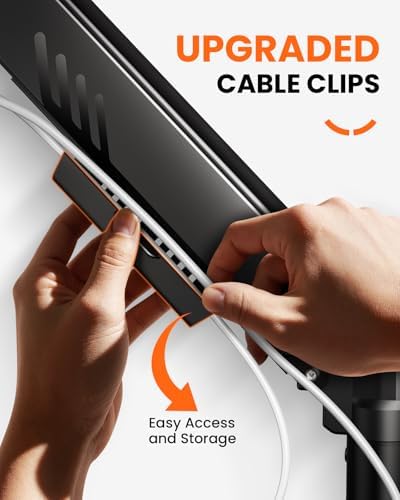
The clamp mechanism fits desk thicknesses up to about 8cm, which covers most standard desks and IKEA tabletops. The cable management channel along the arm keeps your wires organised, which is a huge bonus when every centimetre of desk space counts.
At £28.48, it's outstanding value — the cheapest gas-spring arm by a noticeable margin, yet the build quality doesn't feel cheap. For students on a budget or anyone setting up a small home office, this is the one to buy.
Best for: Overall value on small desks, students, budget-conscious buyers.
2. HUANUO Single Monitor Arm — £25.99
The HUANUO Single Monitor Arm is the closest competitor to the ErGear, and in some ways it's even more impressive. At just £25.99, it's the cheapest gas-spring arm on our list, but it doesn't cut corners where it matters.
This arm supports monitors from 13 to 32 inches and uses a gas-spring mechanism for smooth height adjustment. The C-clamp mount works on both standard desks and grommet-mount setups (where you feed the cable through a hole in your desk), giving you flexibility depending on your desk type.
Where the HUANUO shines in a small space is its compact design. The arm profile is noticeably slim, and once your monitor is mounted, the arm tucks neatly behind the screen, making your desk look cleaner and more spacious. The cable management clips help keep everything tidy.
Installation is straightforward — the included hex key and screws are all you need. The arm comes pre-assembled for the most part, so you're looking at about five minutes of work.
The only slight trade-off is the weight capacity. At 6.8kg, it's a bit lower than the ErGear, but still more than enough for most 24–27 inch monitors. If you have a particularly heavy screen (or an ultra-wide), go for the ErGear instead.
Best for: Ultra-budget setups, slim desks, and lightweight monitors.
How Monitor Arms Help You Maximise Small Desk Space
Let's talk about what happens once you've installed one of these arms. Your monitor effectively floats above the desk surface, which means:
You reclaim 300–400cm² of desk space. That's enough for a full-sized keyboard, a mouse, a notebook, and your phone — all sitting flat on the desk where your monitor stand used to be.
You can push your monitor further back. With a clamp arm, your screen can sit right at the back edge of the desk, giving you more depth in front of it. This is a game-changer on shallow desks.
You get a cleaner look. No more tangled cables running from the back of your monitor down to the desk. Most arms have built-in cable routing that channels everything along the arm itself.
You can switch between sitting and standing. If you ever upgrade to a standing desk converter (like the VIVO range), a monitor arm makes the transition seamless — your screen moves with you.
Buying Guide: What to Look for in a Monitor Arm
Weight Capacity
This is the most important spec. Check your monitor's weight (including the stand) and make sure the arm can handle it. Most budget arms support 6–9kg, which covers 95% of standard monitors up to 27 inches. If you're using an ultra-wide or a heavy professional monitor, look for an arm rated for 10kg+.
Desk Compatibility
Most clamp-on arms fit desk thicknesses between 1cm and 8cm. Measure your desk edge before buying — IKEA tabletops are typically about 3–4cm thick, which is well within range. If your desk has a lip or a metal frame at the back, check that the clamp can grip cleanly.
VESA Compatibility
Monitors use the VESA standard for mounting — typically 75x75mm or 100x100mm. Check the back of your monitor for four screw holes in a square pattern. The ErGear and HUANUO arms both support 75x75 and 100x100 VESA patterns, covering virtually every monitor on the market.
Articulation
Look for at least: tilt (up/down), swivel (left/right), and height adjustment. Rotation (landscape to portrait) is nice to have but not essential for most users. Both arms on this list offer full articulation.
Cable Management
A simple plastic channel or clips along the arm makes a huge difference in keeping your desk tidy. This is a small feature that pays dividends daily.
Comparison Table
| Feature | ErGear Single Monitor Arm | HUANUO Single Monitor Arm |
|---|---|---|
| Price | £28.48 | £25.99 |
| Weight capacity | 9kg | 6.8kg |
| Screen size | 13–34 inches | 13–32 inches |
| VESA patterns | 75x75 / 100x100mm | 75x75 / 100x100mm |
| Mount type | C-clamp / grommet | C-clamp / grommet |
| Gas spring | Yes | Yes |
| Cable management | Built-in channel | Clip-on guides |
| Tool-free installation | Yes | Yes |
| Best for | Heavier monitors, best value | Tightest budget, slim profile |
FAQ
Will a monitor arm work on my IKEA desk?
Yes. Most IKEA desk tops (LINNMON, KARLBY, MALM) are between 3–5cm thick, which is well within the clamp range of both the ErGear and HUANUO arms. Just make sure you tighten the clamp securely.
Can I use a monitor arm with a standing desk converter?
Absolutely. In fact, it's a great combination. A monitor arm lets you position the screen at the right height whether your desk converter is raised or lowered.
Do I need to drill holes for installation?
No. Both arms use a C-clamp that attaches to the back edge of your desk. No drilling required. Some arms also support a grommet mount if your desk already has a cable hole.
Will a single arm hold an ultra-wide monitor?
It depends on the weight. Most ultra-wide monitors weigh 6–10kg. The ErGear arm can handle up to 9kg, which covers many 29–34 inch ultrawides. Always check your monitor's weight before buying.
How long does installation take?
About 5–10 minutes. Attach the VESA plate to your monitor, clamp the arm to your desk, then slide the monitor onto the arm. Both arms come with the necessary tools included.
Can I use two monitor arms side by side on a small desk?
On a desk 120cm or wider, yes. On very small desks (80cm or less), a single arm plus a laptop stand is usually a better configuration. If you need dual screens, consider a dual-monitor arm instead of two singles.
What if my desk has a thick edge?
Check the maximum clamp opening. The ErGear arm fits edges up to about 8cm thick. Most standard desks are well under this limit.
Final Verdict
For most people setting up a small UK home office or student desk, the ErGear Single Monitor Arm at £28.48 is the best choice. It combines a generous 9kg weight capacity, full articulation, tool-free installation, and excellent cable management — all at a price that won't break the bank.
If your budget is absolutely tight and you have a lighter monitor (under 7kg), the HUANUO Single Monitor Arm at £25.99 is an incredible deal. It's a few pounds cheaper and slightly slimmer, making it ideal for the most compact workspaces.
Either way, adding a monitor arm to your small desk is one of the best £25–30 investments you can make. Your neck will thank you, and so will your free desk space.
Top Picks from This Article
We earn a commission if you make a purchase, at no additional cost to you.
ErGear Single Monitor Arm
Fully adjustable gas-spring monitor mount for 13-34 inch screens, tool-free VESA, 9kg capacity
£28.48
Price accurate as of 2026-06-23
Check Price on Amazon →HUANUO Single Monitor Arm

Gas spring single monitor arm for 13-32 inch screens, C-clamp and grommet mount, frees up small desk space
£25.99
Price accurate as of 2026-06-23
Check Price on Amazon →Small Space Living is reader-supported. When you buy through links on our site, we may earn an affiliate commission from Amazon Associates and other affiliate programs. As an Amazon Associate we earn from qualifying purchases.
Prices and availability are accurate as of the date/time indicated and are subject to change. Any price and availability information displayed on Amazon at the time of purchase will apply to the purchase of this product.