The Best Monitor Arms for Small Desks in 2026
Disclosure: This post contains affiliate links. As an Amazon Associate I earn from qualifying purchases. Learn more.
If you're working from a compact desk in a UK flat, studio, or university digs, you know the struggle: your monitor takes up a huge chunk of your limited workspace, leaving barely enough room for a coffee mug, let alone papers or a keyboard. A monitor arm is one of the most effective upgrades you can make — it lifts your screen off the desk surface, freeing up precious real estate while improving your posture at the same time.
In this guide, we'll look at the best monitor arms for small desks available in the UK in 2026, covering what to look for, how to choose the right one for your setup, and our top recommendations.
Why You Need a Monitor Arm in a Small Space
A monitor arm does more than just hold your screen in place. In a small home office setup, it's a genuine space-saving tool. By clamping your monitor to the edge of the desk rather than letting it sit on its bulky stand, you instantly reclaim 15–20 cm of desk depth. That's enough space to slide your keyboard underneath or spread out a notebook.
The ergonomic benefits are just as important. A monitor arm lets you adjust your screen height, tilt, and distance with a gentle push — no need to stack books under your monitor or lean forward awkwardly. For anyone spending long hours studying or working from a small flat, proper screen positioning can make a real difference to neck and eye strain.
What to Look For in a Monitor Arm for a Small Desk
Weight and Size Compatibility
Not every arm works with every monitor. Before buying, check your monitor's weight and VESA pattern (the standard mounting hole spacing on the back of your screen). Most modern monitors use a 75×75 mm or 100×100 mm VESA pattern. The arms we recommend here support 13–34 inch screens and up to 9 kg, which covers the vast majority of home office monitors.
Desk-Clamping Options
For small desks, a C-clamp mount is usually the best choice — it grips the edge of your desk without requiring any drilling. If your desk has a cable grommet hole, some arms also offer a grommet-mount option, which can be more stable. Make sure the clamp fits your desk thickness; most arms accommodate desks from 10 mm to 50 mm.
Adjustment Range
The best monitor arms offer full articulation: height adjustment, tilt, swivel, and rotation from landscape to portrait mode. Gas-spring arms are particularly smooth and easy to adjust compared to spring-based alternatives. In a small space, being able to push your monitor flat against the wall when not in use is a bonus feature worth looking for.
Cable Management
A cluttered desk feels smaller than it is. Many monitor arms include built-in cable clips or channels that route your monitor cables neatly along the arm, keeping them out of sight and out of the way.
Top Monitor Arm Recommendations
ErGear Single Monitor Arm — Best All-Rounder
The ErGear Single Monitor Arm is our top pick for most small UK desks. Priced at £28.48, it offers exceptional value for a gas-spring monitor arm with full articulation. It supports 13–34 inch screens weighing up to 9 kg, covering everything from a compact 22-inch office monitor to a larger ultra-wide display.
What makes the ErGear stand out for small spaces is its tool-free installation and smooth gas-spring mechanism. You can adjust the height, tilt, and swivel effortlessly without any tools, making it easy to fine-tune your screen position throughout the day. The C-clamp is sturdy and fits most desk edges securely.
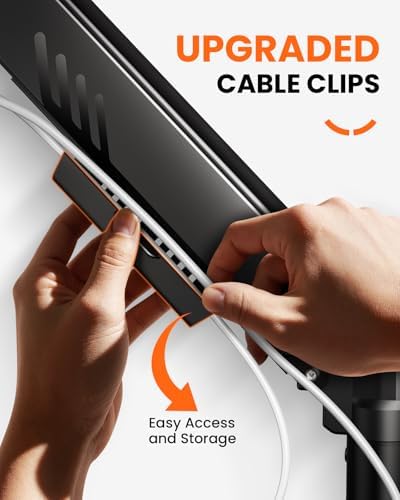
The integrated cable management clips run along the arm, keeping your HDMI and power cables tidy — a small detail that makes a big difference on a cramped desk. Considering the price, this is hard to beat for anyone setting up a budget-friendly home office in a UK flat.
Best for: Most users with a single monitor who want the best balance of price, quality, and ergonomics.
HUANUO Single Monitor Arm — Budget-Friendly Choice
If you're looking to save a few extra pounds, the HUANUO Single Monitor Arm at £25.99 is an excellent budget alternative. It supports 13–32 inch screens and uses a gas-spring mechanism similar to the ErGear, with both C-clamp and grommet mounting options included in the box.
The HUANUO offers a respectable range of motion: +80° to -50° tilt, 360° swivel, and 180° rotation for portrait mode use. The build quality is solid for the price point, with a powder-coated finish that looks clean in any workspace. It supports up to 8 kg, so it won't handle the heaviest 32-inch monitors, but it's perfectly adequate for the typical 22–27 inch screens found in most small home offices.
One thing to note: the cable management on the HUANUO is slightly less refined than the ErGear's — you get basic clips rather than an integrated channel. For most users this is a minor trade-off at the price.
Best for: Budget-conscious users who still want gas-spring adjustment and solid build quality.
How to Choose Between These Monitor Arms
The decision really comes down to your monitor size and budget. If you have a 27-inch or smaller monitor and want the absolute best value, the ErGear Single Monitor Arm at £28.48 is our top recommendation. It's smoother, has better cable management, and supports a wider weight range.
If every pound counts and your monitor is under 8 kg, the HUANUO Single Monitor Arm at £25.99 will serve you well — it offers the same core functionality for a lower price. You're giving up a bit of polish in cable routing and the top end of the weight range, but nothing that affects day-to-day use.
Both arms are easy to install and will transform your small desk setup. For many people, the main benefit is simply getting the monitor off the desk surface — either arm achieves that brilliantly.
Installation Tips for Small Desks
Installing a monitor arm on a small desk is straightforward, but a few tips will make the process smoother:
- Measure your desk edge thickness before ordering — most C-clamps work with edges from 10 mm to 50 mm, but it's worth checking.
- Position the clamp so the arm can reach your natural eye-level position. On a small desk, clamping to the rear edge (rather than the side) usually works best.
- Route cables before mounting the monitor — it's much easier to thread cables through the arm's management channels while the arm is empty.
- Tighten the gas spring tension if your monitor is lighter. Most gas-spring arms have an adjustable tension screw — read the manual and adjust it so the arm stays in position without drooping.
Buying Guide
VESA Compatibility
Before buying any monitor arm, check that your monitor has a VESA mount pattern (75×75 mm or 100×100 mm). Most modern monitors do, but some very budget models or all-in-one computers don't. If in doubt, look up your monitor model specifications online.
Weight Capacity
The rule of thumb is to choose an arm rated for at least 20% more than your monitor's actual weight. Both the ErGear (9 kg capacity) and HUANUO (8 kg capacity) comfortably handle most standard monitors.
Desk Thickness and Shape
C-clamps work best on flat, rectangular desk edges. If your desk has a thick lip, metal frame, or rounded edge, check the clamp's maximum opening. Most arms accommodate up to 50 mm.
Single vs Dual Arm
For a small desk, a single monitor arm is usually the better choice — dual arms take up more clamping space and can feel crowded. If you need two screens, consider a single ultra-wide monitor instead, or use one arm for your primary display and keep the secondary on its stand.
FAQ
Will a monitor arm work on any desk?
Most monitor arms use a C-clamp that works on desk edges up to 50 mm thick. If your desk has a thick lip or unusual edge, check the clamp specs before buying. Some arms also offer a bolt-through grommet mount for desks with cable holes.
Can I use a monitor arm with a laptop?
Monitor arms are designed for desktop monitors with VESA mounts. For laptops, you'd need a laptop arm or a separate laptop stand. Some monitor arms offer a VESA laptop tray attachment as an add-on.
How much desk space does a monitor arm save?
A typical monitor stand takes up about 20–25 cm of desk depth. A monitor arm lifts the screen entirely off the desk surface, effectively reclaiming that full depth. On a 60 cm deep desk, that's roughly 40% of your workspace saved.
Are monitor arms easy to install?
Yes — most modern monitor arms are tool-free or require only a single Allen key (included). Expect the installation to take 10–20 minutes. The most time-consuming part is usually routing the cables neatly.
Do monitor arms work with curved monitors?
Yes, most monitor arms work with curved monitors as long as the VESA pattern matches and the weight is within the arm's capacity. Curved monitors can actually benefit more from an arm since adjusting their position is harder on a fixed stand.
Is £25–30 reasonable for a monitor arm?
Absolutely. Both the ErGear at £28.48 and the HUANUO at £25.99 offer excellent value. Gas-spring arms in this price range perform almost identically to £60+ options — you're paying for build quality and brand, not core functionality.
Top Picks from This Article
We earn a commission if you make a purchase, at no additional cost to you.
ErGear Single Monitor Arm
Fully adjustable gas-spring monitor mount for 13-34 inch screens, tool-free VESA, 9kg capacity
£28.48
Check Price on Amazon →HUANUO Single Monitor Arm

Gas spring single monitor arm for 13-32 inch screens, C-clamp and grommet mount, frees up small desk space
£25.99
Check Price on Amazon →Small Space Living is reader-supported. When you buy through links on our site, we may earn an affiliate commission from Amazon Associates and other affiliate programs. As an Amazon Associate we earn from qualifying purchases.
Prices and availability are accurate as of the date/time indicated and are subject to change. Any price and availability information displayed on Amazon at the time of purchase will apply to the purchase of this product.